The following is a summary of best practices for using goenv (latest recommended approach for 2025), helping you avoid common pitfalls and improve development efficiency and team consistency.
1. Installation and Basic Configuration (Recommended Method)
brew install goenv
// If the latest golang version is not found, upgrade
brew upgrade goenv
# Recommended: install via git (supports auto-update)
git clone https://github.com/go-nv/goenv.git ~/.goenv
# Add to shell (zsh or bash)
echo 'export GOENV_ROOT="$HOME/.goenv"' >> ~/.zshrc
echo 'export PATH="$GOENV_ROOT/bin:$PATH"' >> ~/.zshrc
echo 'eval "$(goenv init -)"' >> ~/.zshrc
source ~/.zshrcDo not install goenv via homebrew (macOS), as the brew version updates very slowly and doesn’t support many new Go versions.
2. Core Best Practices
| Scenario | Recommended Approach | Command Example |
|---|---|---|
| Project-level fixed Go version | Place .go-version file in each project root directory (goenv reads this first) | goenv local 1.23.4 |
| Team unified version | Commit .go-version to git, team automatically unified | echo “1.23.4” > .go-version && git add .go-version |
| Global default version | Only set one fallback version, used when not using a specific version | goenv global 1.23.4 |
| Temporary version switch | Use shell isolation, doesn’t affect project | GOENV_VERSION=1.22.8 go run main.go or goenv shell 1.22.8 |
| Check current version | Use goenv command instead of go version (latter may read system Go) | goenv version or go version-name |
3. Recommended Version Management Strategy (Important!)
# 1. Project forced specification (strongly recommended, do this for all projects)
cd myproject
goenv local 1.23.4    # Automatically generates .go-version

# 2. Global only set one commonly used stable version (optional)
goenv global 1.23.4

# 3. Never rely on system-installed Go (macOS/Linux distro versions are very old)
4. Best Practices for Integration with Other Tools
| Tool | Recommended Configuration |
|---|---|
| direnv | Highly recommended! Automatically loads layout go or use goenv in .envrc |
| asdf | Not recommended to use asdf to manage Go simultaneously, conflicts easily, just use goenv |
| docker | Use official golang image in Dockerfile, don’t rely on host goenv |
| vscode | After installing Go plugin, automatically recognizes .go-version, no additional configuration needed |
direnv example (powerful combination):
# .envrc
use goenv
layout go   # Automatically creates gopath bin for project isolation
5. Common Pitfalls & Solutions
| Problem | Solution |
|---|---|
go: command not found | Check if eval "$(goenv init -)" was executed, reopen terminal or source it |
Installed new Go but go version still shows old | You may have system Go earlier in PATH, put goenv init - at the front of PATH |
| go mod download slow | Configure GOPROXY (unrelated to goenv, but often used together)go env -w GOPROXY=https://goproxy.cn,direct |
| Switching versions between multiple projects is troublesome | Use direnv + .go-version for automatic switching |
6. Recommended Complete ~/.zshrc Configuration Snippet (2025 Edition)
export GOENV_ROOT="$HOME/.goenv"
export PATH="$GOENV_ROOT/bin:$PATH"
eval "$(goenv init -)"
export PATH="$GOROOT/bin:$PATH"
export PATH="$PATH:$GOPATH/bin"

# China acceleration (highly recommended)
export GOPROXY=https://goproxy.cn,direct
export GOSUMDB=sum.golang.google.cn
Exception Handling
// For some editors that may cache the GOPATH environment variable, quit and reload
vscode quit
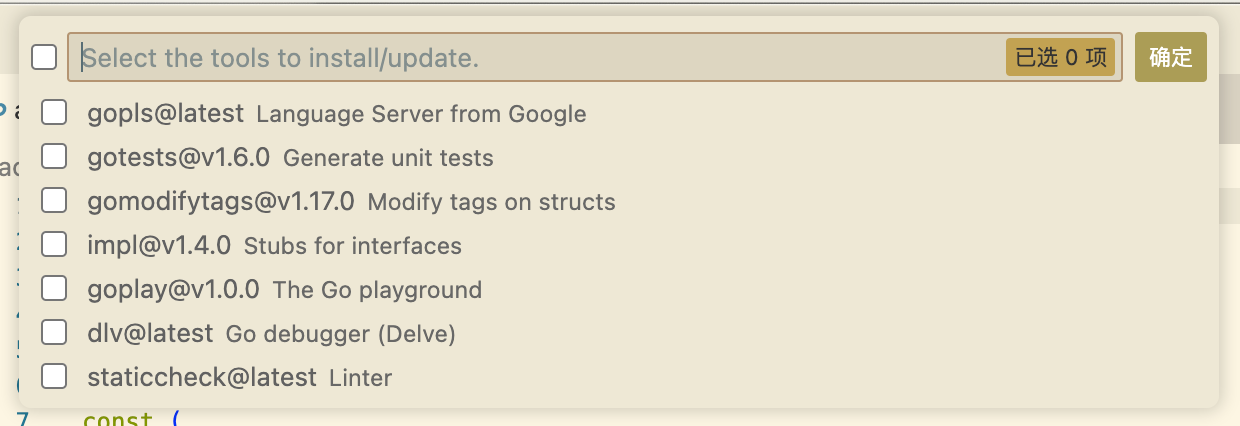
Working with vscode

Update vscode go plugin’s analysis tools, select all and reinstall
Clear Cache
Go has multiple cache directories
go clean cacheSummary: Golden Rules (Memorize These)
- Every project root directory must have
.go-version(commit to git) - Global version only set one fallback
- Use direnv for automatic switching (doubles efficiency)
- Never rely on system-installed Go
- Use
goenv localinstead ofgoenv shellto set project version
Follow the above, and you’ll basically never step into Go version management pitfalls again, and team collaboration will be extremely smooth. Have fun!